Validate user input
Any widget that derives from Entry has the ability to validate the user input. When
the widget is in an invalid state, the border color changes to a danger color.
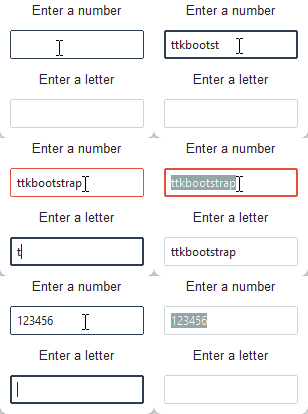
In this example, the validation type is focus, which means that the validation
function is run everytime the widget receives or loses focus. There are several
other types of validation, and many ways to configure the validation. A future
tutorial will discuss this in more detail, but in the meantime, you can consult
the tcl/tk documentation for more
information on what is available for validation.
import ttkbootstrap as ttk
from ttkbootstrap.constants import *

def validate_number(x) -> bool:
    """Validates that the input is a number"""
    if x.isdigit():
        return True
    elif x == "":
        return True
    else:
        return False

def validate_alpha(x) -> bool:
    """Validates that the input is alpha"""
    if x.isdigit():
        return False
    elif x == "":
        return True
    else:
        return True

# create the toplevel window
root = ttk.Window()
frame = ttk.Frame(root, padding=10)
frame.pack(fill=BOTH, expand=YES)

# register the validation callback
digit_func = root.register(validate_number)
alpha_func = root.register(validate_alpha)

# validate numeric entry
ttk.Label(frame, text="Enter a number").pack()
num_entry = ttk.Entry(frame, validate="focus", validatecommand=(digit_func, '%P'))
num_entry.pack(padx=10, pady=10, expand=True)

# validate alpha entry
ttk.Label(frame, text="Enter a letter").pack()
let_entry = ttk.Entry(frame, validate="focus", validatecommand=(alpha_func, '%P'))
let_entry.pack(padx=10, pady=10, expand=True)

root.mainloop()